
When Amazon takes down an account or a listing, the only way to get back is through their appeal system. That process is how Amazon reviews your explanation, checks any proof you provide, and decides whether you’ve fixed the issue. A clean and simple appeal gives the Seller Performance team what they need and usually leads to faster decisions.
What the Amazon Appeal Process Involves
The appeal system is Amazon’s formal way of letting sellers respond when something gets suspended. Your job is to show what went wrong, what you fixed, and how you’ll avoid the mistake in the future. Amazon isn’t looking for long stories – they want a straightforward Plan of Action that matches the problem mentioned in your suspension notice.
You’ll use this process from Amazon Account Reinstatement Service when Amazon blocks an account, removes a listing, or asks for certain documents tied to compliance or product quality.
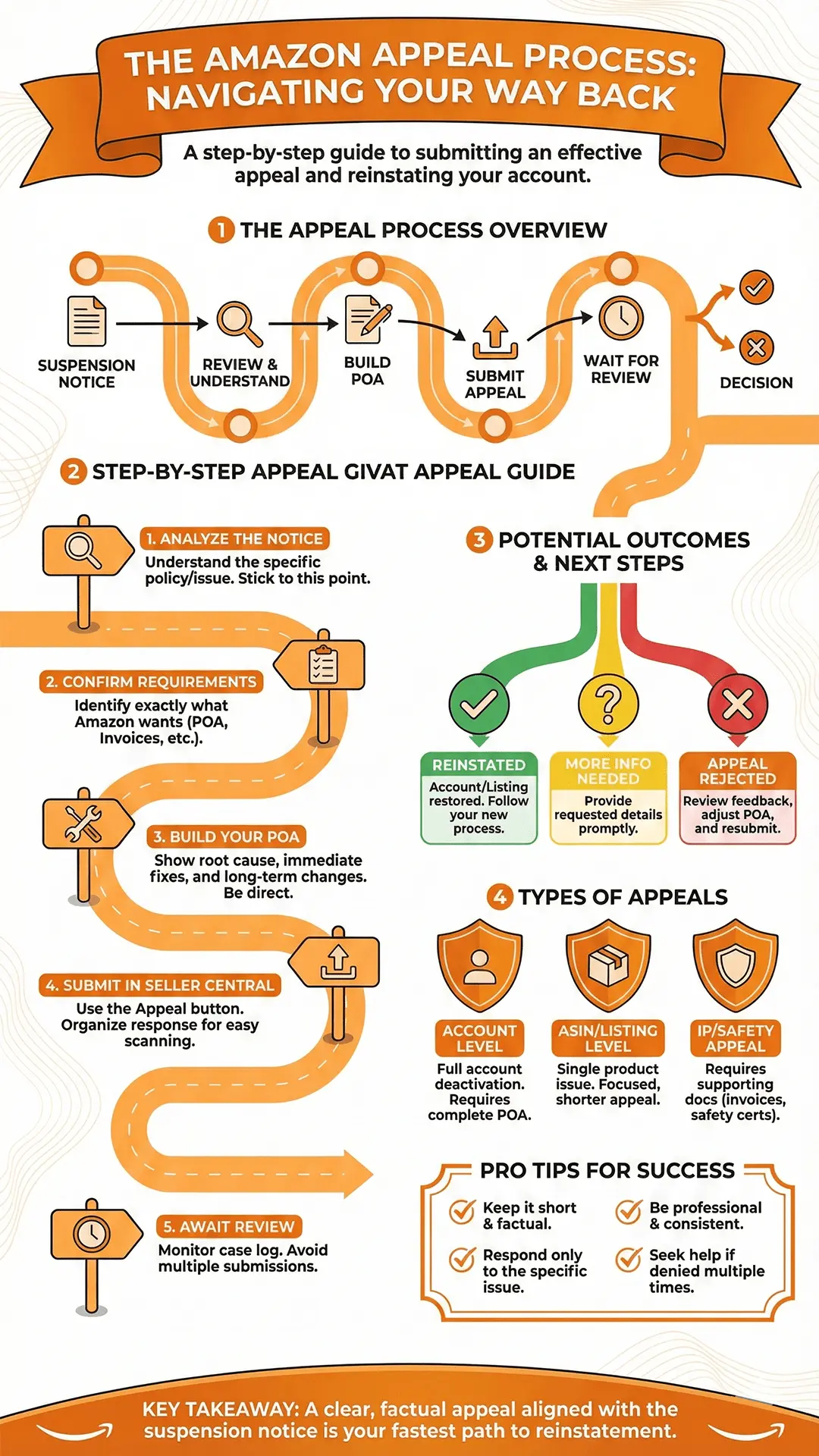
Step-by-Step Amazon Appeal Process
Step 1 – Look Closely at Your Suspension Notice
Every case starts with the message Amazon sends you. It usually points to the policy or performance issue behind the suspension. That message tells you exactly what to respond to, and sticking to it is important. Guessing or giving extra explanations often leads to quick rejections.
Step 2 – Check What Amazon Wants From You
Before writing anything, confirm what Amazon requested.
It may be:
- A formal POA
- Invoices
- Authentication letters
- Safety documents
- Business verification
- Extra details about your workflow
Once you know what they want, you can shape your response around it.
Step 3 – Build Your Plan of Action (POA)
Your POA needs to show three simple things:
- What caused the issue
- What you fixed immediately
- What you changed for the long run
Short, direct statements work best. Amazon reviewers go through a huge number of appeals, so a clean format helps your case.
Step 4 – Submit the Appeal Inside Seller Central
Use the “Appeal” or “Provide Additional Information” button. Attach only the documents Amazon asked for. Organize your response so it’s easy to scan – long paragraphs can slow you down here.
Step 5 – Wait for Amazon’s Review
Amazon reviews appeals manually. Some cases move quickly, others take longer depending on the type of violation. Keep an eye on your case log and email, because Amazon might request more details.
Avoid sending multiple appeals while waiting. It usually causes delays or mixed responses.
What Happens After You Submit the Appeal
Possible Results
Amazon may:
- Reinstate your account or listing
- Ask you for more information
- Reject the appeal
Each outcome gives you clarity on your next move.
If Your Appeal Gets Rejected
A rejection doesn’t mean the case is finished. It simply means your POA wasn’t strong enough. Review Amazon’s reply, adjust your explanation, and tighten your corrective steps or documents. Sometimes rewriting the entire POA with a simpler format works better than trying to “patch” the old one.
Types of Appeals You Might File
Account Level Appeal
Used when your seller account is fully deactivated. These usually require a complete POA and sometimes evidence.
ASIN Level or Listing Appeal
Focused on one product. These appeals are usually shorter and cover only that specific listing.
IP or Product Safety Appeal
These cases must include supporting documents like invoices, authorization letters, or safety certifications.
Situations Better Handled by Seller Support
Some issues shouldn’t go through the appeal channel at all, such as:
- Catalog problems
- Listing merge errors
- FBA storage or warehouse mistakes
- Backend data bugs
These are handled by Seller Support, not the performance team.
Tips That Help During the Appeal Process
- Keep everything short and factual
- Respond only to the specific issue Amazon mentioned
- Don’t send multiple submissions
- Be professional and consistent in your tone
These small things make a noticeable difference.
How Long the Appeal Process Usually Takes
Most appeals are reviewed within a few days. More complex cases or missing documents can extend the timeline. If Amazon asks for more information, responding quickly can help move things forward.
When Professional Help Might Make Sense
You may want support when:
- You’ve been denied multiple times
- You need to show documents properly
- You run a large brand, and downtime costs you money
Sometimes a fresh look at the POA helps identify what Amazon still wants from you. For professional help, you can contact AAR Services.
Conclusion
If you keep your appeal simple and align your POA with Amazon’s suspension notice, the appeal process becomes easier to manage. A solid appeal highlights what happened, what you fixed, and the steps you’ll follow to prevent the same issue again. This approach helps you get reinstated faster and protects your account long-term.